May 07, 2026
OpenAI API for Data Analysis and Anomaly Detection: A 2026 Practical Guide


Using the OpenAI API for data analysis and anomaly detection in 2026 comes down to combining a handful of building blocks: the Responses API’s Code Interpreter for ad-hoc analysis, Function Calling and Structured Outputs for pipeline extraction, Embeddings and RAG for search over your own data, and a classical ML detector — Isolation Forest, PyOD — paired with an LLM for anomaly explanation, all routed across GPT-5.6’s three tiers by cost and task difficulty. Before any of that, there’s one thing every team on this API needs to handle first: migrating off the Assistants API, which OpenAI shuts down on August 26, 2026.
This guide walks through each of those pieces with working code, current pricing, and an honest look at where OpenAI is — and isn’t — the right tool compared to Claude and Gemini.
KEY TAKEAWAYS
Before anything else: the Assistants API shuts down August 26, 2026
If any part of your stack calls /v1/assistants, /v1/threads, or /v1/threads/runs, this is the most urgent fact in this article.
OpenAI announced the Assistants API’s deprecation on August 26, 2025, with a hard removal date exactly one year later: August 26, 2026. After that date, those endpoints return errors — there is no degraded mode, no grace period, and no automated migration tool for moving Threads into the replacement Conversations API.
What this means in practice:
- Assistants → Prompts. Assistant configurations move to the dashboard as Prompts.
- Threads → Conversations. You rebuild conversation history manually; there’s no one-click export.
- Runs → Responses. Model calls move to the Responses API.
- Run Steps → Items. Tool-call bookkeeping is now explicit rather than managed for you.
- Vector stores and files persist — they carry over into the Responses API’s file_search tool. Assistant and thread objects do not.
- If you use Zapier’s “ChatGPT (OpenAI)” Assistants-API steps, those Zaps break on the shutdown date and need to be manually rebuilt using the “Conversation (Responses API)” action.
If you’re migrating, export your assistants, vector stores, and files to JSON before the deadline — after August 26, 2026, that data is gone.
VERIFY: OpenAI’s own migration guide is the canonical reference.
The OpenAI API is the standard way to integrate OpenAI’s models — GPT-5.6 (Sol, Terra, Luna), GPT-4.1, the o-series reasoning models (o3, o4-mini), and specialized models for embeddings, image generation, and speech — into your own applications. For data teams, it remains one of the most practical tools for accelerating data analysis, anomaly detection, RAG-based search, and AI-assisted reporting. You can connect to it from Python, JavaScript, or virtually any HTTP-capable environment, and you don’t need to train your own models from scratch.
In 2026, the OpenAI API is standard infrastructure for data and AI work. The open question isn’t whether to use it, but which model and which pattern (Responses API, Embeddings, Function Calling, Structured Outputs, RAG) fits each problem, and how to stay portable to Anthropic’s Claude and Google’s Gemini when they’re the better fit.
How to use the OpenAI API: getting started
Before any of the patterns below make sense, you need a working connection to the API. This is the minimal path from zero to your first successful call.
- Create an account and get an API key. Sign up at platform.openai.com, then generate a key under Settings → API keys. Treat it like a password — never commit it to a repository or expose it client-side; server-side code only.
- Set the key as an environment variable.
export OPENAI_API_KEY="sk-..."
The official SDKs read this automatically, so you never hardcode the key in your source.
- Install the SDK.
pip install openai        # Python
npm install openai        # JavaScript / TypeScript
- Make your first call.
from openai import OpenAI

client = OpenAI()  # reads OPENAI_API_KEY from the environment

response = client.responses.create(
    model="gpt-5.6-terra",
    input="Summarize the key differences between Isolation Forest and a PyOD autoencoder for anomaly detection, in three sentences.",
)

print(response.output_text)
TIP: Confirm response.output_text is still the correct convenience accessor in the current SDK version; check the Responses API reference if the field has changed.
- Pick a model deliberately, not by default. gpt-5.6-terra above is a reasonable default for exploration — capable enough for most tasks, cheaper than Sol. Once you know the shape of your workload, revisit the Cost considerations table below and route accordingly: Luna for high-volume simple tasks, Sol only where correctness matters more than cost.
- From here, attach tools. A bare call like the one above only generates text. The patterns that make the API useful for data work — analyzing an uploaded file, returning structured JSON, retrieving your own documents — all come from attaching a tools parameter to the same responses.create() call, which is what the rest of this guide covers, starting with Code Interpreter below.
If you’re coming from the Assistants API specifically, skip the account/key/SDK setup above (you already have it) and go straight to the shutdown section above for the migration path.
What the OpenAI API is good for in data work
Data analysis and reporting
The OpenAI API can identify key phrases, generate descriptive statistics, and surface correlations across a dataset in plain language, then turn that into a report, summary, or structured extraction a downstream system can consume.
Data augmentation
Working with a small or imbalanced dataset is a recurring blocker in model training. The OpenAI API supports two forms of augmentation: generating synthetic text variants (paraphrases, edge-case rewrites) to expand limited natural-language data, and generating synthetic structured records (support tickets, product reviews) when real data is scarce or privacy-restricted.
In 2026, this is increasingly paired with dedicated synthetic-data tools (Gretel, Mostly AI, Synthetic Data Vault) for tabular and time-series work, with the OpenAI API handling the natural-language side specifically.
Anomaly detection
Anomaly detection — flagging data points that fall outside the norm — is where LLMs and classical ML play genuinely different roles, and where this guide goes deeper than a single “use GPT for anomalies” recommendation.
The patterns, not just the model:
| Pattern | What it does | Typical tools |
|---|---|---|
| Direct detection | Prompt or chain-of-thought reasoning flags anomalies directly from raw or lightly-processed data | GPT-5.6 Sol/Terra, o4-mini |
| Data augmentation | LLM generates synthetic anomalies to train a classical detector | GPT-5.6, PyOD 2 |
| Explanation generation | LLM explains why a flagged point is anomalous, in plain language | GPT-5.6, Claude, Gemini |
| Representation learning | LLM embeddings serve as a feature transformer feeding a classical detector | text-embedding-3-large, PyOD 2 |
| Model selection | LLM recommends which detection algorithm fits the data shape | PyOD 2’s built-in LLM-powered model selection |
| Multi-agent systems | Coordinated agents generate, test, and refine detection rules | Custom agent frameworks |
| Reverse monitoring | Anomaly detection is turned on the LLM/agent system itself, watching for unsafe or unexpected agent behavior | NVIDIA Morpheus, OpenTelemetry for GenAI, Arize Phoenix |
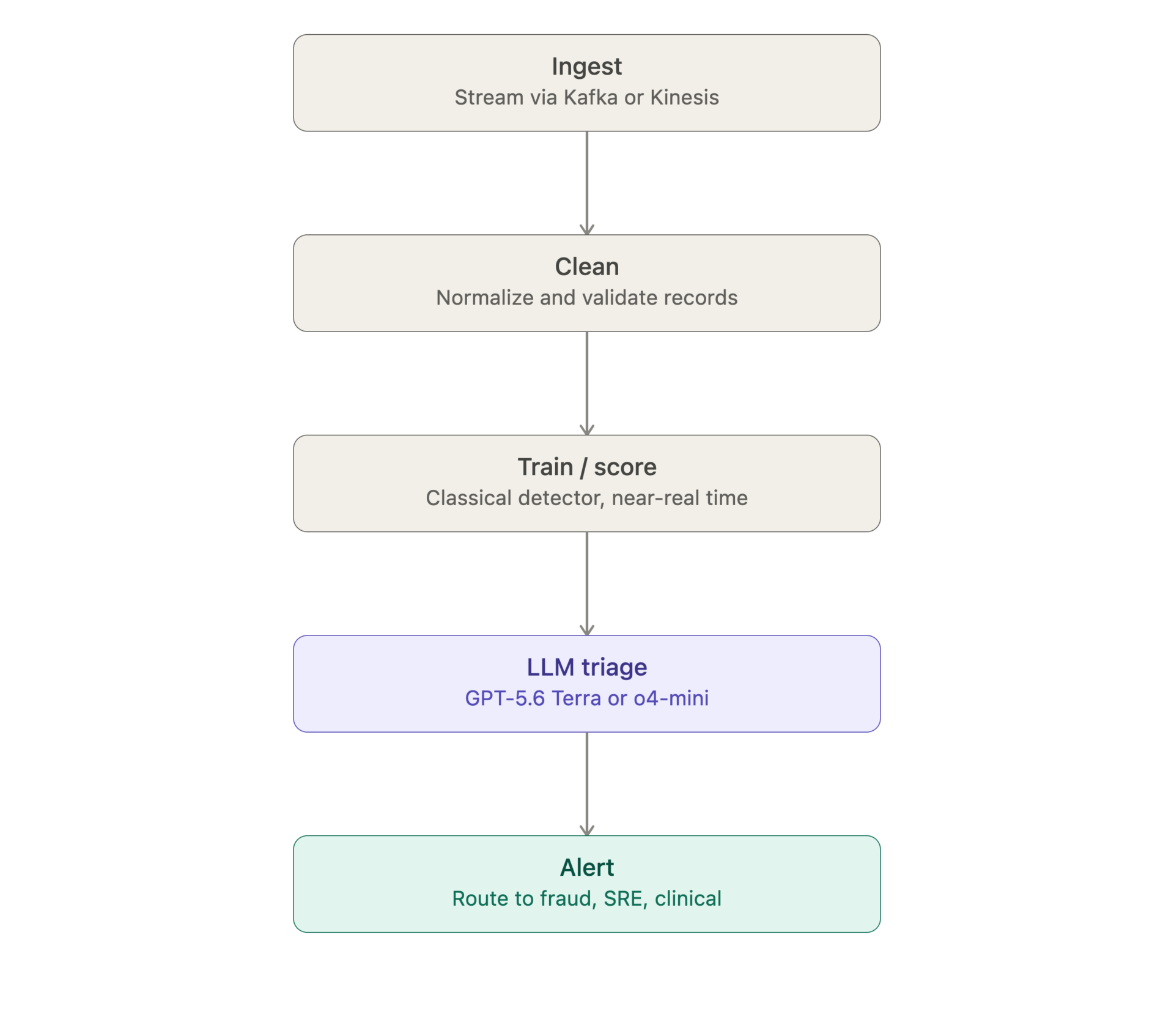
Most production systems in 2026 use a hybrid architecture rather than picking one: a classical detector (Isolation Forest, Local Outlier Factor, or an autoencoder via PyOD) runs cheaply over the full data volume and flags candidates; an LLM (GPT-5.6 Terra or o4-mini) is called only on those candidates to explain the anomaly and rank it by business impact.
Worked example — transaction fraud: feed transaction records (amount, merchant category, velocity, geolocation deltas) through an Isolation Forest to flag the top 0.5% by anomaly score. Pass only those flagged transactions, plus surrounding context, to GPT-5.6 Terra with a Structured Outputs schema that requires a risk category, a plain-language explanation, and a recommended action. This mirrors the pattern used for patient-vitals monitoring (heart rate, blood pressure thresholds trigger the classical detector; the LLM drafts the clinician-facing note) and network security (HTTP/DNS logs feed the classical layer; the LLM triages and explains for the SOC analyst).
For image-based anomaly detection (defective parts, medical imaging, satellite imagery), the multimodal capabilities of GPT-5.6, Gemini 3.1 Pro, and Claude Opus now match or exceed dedicated vision models for many use cases — though purpose-built models like YOLO or anomalib still win on highly specialized industrial tasks.
Monitoring the pipeline itself
An anomaly-detection pipeline that includes an LLM step needs its own monitoring — a point that’s easy to miss precisely because “anomaly detection” sounds like the monitoring layer already. In practice, teams run a second, smaller observability layer over the LLM/agent pipeline itself:
- Arize Phoenix and Braintrust for tracing LLM calls, catching quality regressions, and evaluating outputs against a golden set.
- OpenTelemetry for GenAI for standardized tracing across the pipeline.
- Confident AI for automated evaluation pipelines.
This closes the loop: classical ML plus LLM detects anomalies in your business data, while a separate observability layer detects anomalies in the detection system itself — the “reverse monitoring” pattern above.
A production streaming pipeline
A typical real-time anomaly-detection pipeline that incorporates an LLM step runs in five stages:
Building assistants, chatbots, and sentiment tools
The OpenAI API also underpins more conventional NLP work: virtual assistants and chatbots that hold voice or text conversations, and sentiment-analysis tools that classify support tickets, reviews, or social posts as positive, negative, or neutral in real time, so a team can react to negative feedback quickly.
OpenAI models and API surfaces for data analysis
Four capabilities matter most for data work at scale:
1. Code Interpreter, via the Responses API
Upload a CSV, Parquet, or Excel file and ask the model to analyze it in natural language. The model writes and executes Python (pandas, numpy, matplotlib, scikit-learn) behind the scenes, then explains the result. Best for ad-hoc analysis and exploratory work. This capability now lives in the Responses API’s Code Interpreter tool — not the Assistants API, which is shutting down.
Here’s a minimal working example — upload a CSV, ask for an analysis, and pull back the generated chart:
from openai import OpenAI

client = OpenAI()

# 1. Upload the file
with open("sales_data.csv", "rb") as f:
    uploaded_file = client.files.create(file=f, purpose="assistants")
    # [VERIFY] "assistants" is the purpose value historically used for this
    # upload flow; since the Assistants API itself is shutting down, confirm
    # whether the Responses API's Code Interpreter tool now expects a
    # different `purpose` value (e.g. "user_data") against the current
    # Files API reference before shipping this in production.


# 2. Call the Responses API with the Code Interpreter tool
response = client.responses.create(
    model="gpt-5.6-terra",
    tools=[{
        "type": "code_interpreter",
        "container": {"type": "auto", "file_ids": [uploaded_file.id]}
    }],
    input=(
        "Analyze sales_data.csv for revenue anomalies by region. "
        "Flag any region where monthly revenue deviates more than 2 "
        "standard deviations from its 6-month rolling average, and "
        "plot the flagged months on a chart."
    ),
)

# 3. Extract the text explanation and any generated files (e.g. the chart)
for item in response.output:
    if item.type == "message":
        for block in item.content:
            if block.type == "output_text":
                print(block.text)
    if item.type == "code_interpreter_call":
        for output_file in getattr(item, "outputs", []) or []:
            if output_file.type == "image":
                # download via the Files API using output_file.file_id
                image_bytes = client.files.content(output_file.file_id).read()
                with open("anomaly_chart.png", "wb") as out:
                    out.write(image_bytes)
TIP: Confirm the exact response-object field names against OpenAI’s Responses API reference before shipping, and confirm the correct purpose value for this upload flow against the Files API reference — both have changed between releases in 2026.
2. Function Calling and Structured Outputs
Describe a JSON schema in the request, and the model returns data conforming exactly to it. This is the foundation pattern for pipelines: extracting fields from unstructured documents into structured columns, classifying records, or triggering downstream functions. Structured Outputs guarantees schema compliance, which Function Calling alone did not.
3. Embeddings + Retrieval-Augmented Generation (RAG)
Convert documents to vector embeddings with text-embedding-3-large or text-embedding-3-small, store them in a vector database (Pinecone, Weaviate, pgvector, ChromaDB, Qdrant), then retrieve relevant passages at query time and pass them to the model as context. This remains the dominant enterprise pattern for grounded Q&A and semantic search in 2026.
4. Batch API for high-volume workloads
For thousands or millions of records, the Batch API processes requests asynchronously at roughly half the synchronous cost — best for historical datasets, large-scale classification, and bulk document analysis where latency doesn’t matter.
Most data teams combine several of these: RAG for search, Function Calling for extraction, the Batch API for bulk processing, and Code Interpreter for ad-hoc analysis.
How the OpenAI API translates into business results
- Optimizes supply chains and surfaces cost savings. Feeding procurement, inventory, and logistics data through Function Calling or RAG lets a model surface where demand forecasts are drifting from actuals, which suppliers are trending toward late delivery, or where inventory is quietly building up in a specific warehouse — the kind of pattern that’s easy to miss in a dashboard but shows up quickly when a model is asked to explain deviations from plan.
- Improves customer experience and satisfaction. Sentiment analysis over support tickets, reviews, and call transcripts turns “we think satisfaction dropped last quarter” into a ranked list of the specific issues driving it, with the negative feedback surfaced for action instead of buried in a backlog. Combined with a chatbot or virtual assistant built on the same API, teams can also respond in real time rather than after a quarterly review.
- Enhances content creation and reporting. Text generation and summarization cut the time spent on first-draft reports, translated content, and structured extraction from documents (contracts, invoices, compliance filings) into JSON fields a downstream system can use directly, thanks to Structured Outputs.
- Automates monotonous or repetitive analytical tasks. Classification, tagging, first-pass triage of support tickets or claims, and routine descriptive-statistics summaries are the kind of high-volume, low-ambiguity work that’s well suited to a cheap model (GPT-5.6 Luna, GPT-4.1 nano) called through the Batch API, freeing analysts for the harder 20% of the work.
- Improves productivity and efficiency in manufacturing. Multimodal anomaly detection over defect images, combined with natural-language explanation of what’s wrong with a flagged part, shortens the loop between a quality issue appearing on the line and someone understanding why.
- Identifies fraudulent activity in transactions, identity verification, and insurance claims. This is the anomaly-detection use case in practice: a classical detector flags statistically unusual transactions or claims, and an LLM turns the flagged list into a plain-language, ranked triage queue for a fraud analyst — see the worked example in the Anomaly Detection section above for exactly how that pipeline is usually structured.
Cost considerations
OpenAI API pricing is tier-based and changes often enough that every figure below should be treated as a snapshot, not a budget input.
Before finalizing any cost model, verify current rates directly on OpenAI’s pricing page.
| Tier | Example models | Input ($/1M tokens) | Output ($/1M tokens) | Notes |
|---|---|---|---|---|
| Budget | GPT-5.6 Luna, GPT-4.1 nano | $0.20 (Luna, since Jul 30, 2026 price cut) | $1.20 (Luna) | Best default for high-volume, low-ambiguity work |
| Balanced | GPT-5.6 Terra | $2.00 (short context) | $12.00 (short context) | Roughly 2x o4-mini’s rate — a distinct tier, not the same price point |
| Reasoning | o4-mini | [VERIFY] | [VERIFY] | OpenAI’s own model page labels $1.10/$4.40 as the Batch API rate, but independent trackers treat this as the standard rate, with batch likely closer to $0.55/$2.20 — confirm directly before publishing. Reasoning models also bill internal “thinking” tokens at output rates, so real cost can run 3–10x the base rate on hard problems |
| Flagship | GPT-5.6 Sol | $5.00 (short context) | $30.00 (short context) | Unchanged by the Jul 30, 2026 price cut, which only affected Terra and Luna. Reserve for tasks where correctness matters more than cost |
| Embeddings | text-embedding-3-large | $0.13 | — (no output cost) | |
| Embeddings | text-embedding-3-small | $0.02 | — (no output cost) | Far cheaper than any chat model; usually a rounding error in the total bill |
| Batch API | any model | ~50% of synchronous rate | ~50% of synchronous rate | For non-latency-sensitive workloads only |
Three practical ways to manage cost:
- Route by task difficulty
Send simple, high-volume queries — classification, tagging, short extraction — to a cheap model (GPT-5.6 Luna, GPT-4.1 nano). Reserve Sol or o4-mini for the subset of requests that actually need deep reasoning or long-context recall. Frameworks like LangChain, LangGraph, and OpenRouter make this routing logic straightforward to implement, and a router is usually the single highest-leverage cost change a team can make — cutting spend 40–70% in practice without a noticeable quality drop, because most production traffic is easy traffic. - Cache aggressively and batch what isn’t latency-sensitive
OpenAI’s prompt caching applies automatically to sufficiently long, repeated prompt prefixes and can cut input costs by 75–90% on that portion of the request — so put stable content (system prompts, few-shot examples, retrieved context that repeats across calls) first in the prompt, and volatile content last. Separately, anything that doesn’t need a synchronous response — historical backfills, nightly classification runs, bulk document extraction — belongs in the Batch API at roughly half price. - Audit prompt design before touching model choice
The most common cost surprise isn’t which model you picked — it’s how the prompt is built. Unnecessarily long context windows, system prompts repeated verbatim on every call instead of relying on caching, and defaulting to the flagship model “to be safe” are the three patterns that most reliably inflate a bill. A quick audit — token-count your typical request, check what fraction is repeated boilerplate versus genuinely new content, and confirm you’re not sending a flagship-tier prompt to do nano-tier work — usually finds savings before any router or caching change is even needed.
OpenAI API vs Claude vs Gemini: when to pick what
All three are frontier-tier APIs in 2026, and most enterprise teams use more than one rather than standardizing on a single provider.
| Provider | Best for | Context window | Cost tier (flagship) | Notes |
|---|---|---|---|---|
| OpenAI | Broadest tool ecosystem, voice (Realtime API), o-series reasoning | ~1M tokens (GPT-4.1, GPT-5.6) | $5/$30 per 1M (Sol) | Widest third-party integration support |
| Anthropic Claude | Coding and agentic tool-use reliability, long-form analytical writing | Up to 1M tokens (Sonnet 4/5, public beta) | Opus 5 $5/$25, Sonnet 5 $2/$10, Haiku 4.5 $1/$5 per 1M tokens; Fable 5 (long-horizon agents) $10/$50 | Strong safety-conscious enterprise track record — docs |
| Google Gemini | Native long-context multimodal (video + audio + text together), aggressive pricing at scale | Up to 2M+ tokens (Gemini 3.1 Pro) [VERIFY] | [VERIFY current Gemini pricing] | Best fit when the workload genuinely needs combined video/audio/text in one context — docs |
For self-hosted or data-sovereignty needs, open-weight models (Llama 4, DeepSeek, Mistral Large 2) via hosts like Together AI or Fireworks are production-ready alternatives to any of the three APIs above.
Most enterprise data teams in 2026 use a model router that sends each request to whichever model fits the task and price profile, rather than picking one provider for everything. For a deeper comparison, see our piece on Gemini, GPT, and Claude and on LangChain vs LlamaIndex.
Final thoughts
The interesting questions about the OpenAI API in 2026 have shifted: not “should we use it?” but “which model, which pattern, and for how much longer will this specific API surface exist?” — a question the Assistants API shutdown makes concrete right now. Not “can it work?” but “how do we evaluate quality, govern cost, and stay portable to Claude and Gemini?” Not “what can it do?” but “where does it stop, and where do classical ML, vector search, or self-hosted models take over?”
The teams getting the most value in 2026 use the OpenAI API where it genuinely helps — RAG, structured extraction, content generation, ad-hoc analysis, anomaly explanation — use cheaper specialized tools where those win (classical ML for tabular prediction, dedicated OCR for documents, vector databases for retrieval), and build evaluation infrastructure that catches quality regressions when OpenAI ships a model update.
Read More
If you’d like help designing an OpenAI- or LLM-based data analysis system — a Responses API migration, RAG implementation, structured extraction pipeline, or evaluation infrastructure — book a 30-minute call with our team. You can also explore our Generative AI Development, LLM Development, and AI Consulting services.
References
- OpenAI. Deprecations — Assistants API shutdown notice. developers.openai.com/api/docs/deprecations
- OpenAI. Assistants-to-Responses migration guide. developers.openai.com/api/docs/assistants/migration
- OpenAI. API documentation — Responses API, Embeddings, Function Calling, Structured Outputs, Batch API. developers.openai.com/api/docs
- OpenAI. API pricing. developers.openai.com/api/docs/pricing
- Anthropic. Claude API documentation. platform.claude.com/docs
- Google. Gemini API documentation. ai.google.dev/gemini-api/docs
- Artificial Analysis. Independent LLM benchmark comparisons. artificialanalysis.ai
- Gartner. Top Strategic Technology Trends for 2026 — domain-specific LLM adoption forecast, as reported by Network World.
- Lewis et al. Retrieval-Augmented Generation for Knowledge-Intensive NLP Tasks (2020). arxiv.org/abs/2005.11401
FAQ
How can OpenAI API benefit data science projects?What happens to applications built on OpenAI's Assistants API after the August 26, 2026 shutdown?


Every call to /v1/assistants, /v1/threads, and /v1/threads/runs starts returning errors — there’s no grace period. The recommended replacement is the Responses API for model calls plus the Conversations API for chat history. OpenAI has said it won’t provide an automated migration tool, so teams rebuild assistants and threads manually. Vector stores and files carry over into the Responses API’s file-search tool; assistant and thread objects do not.
Does GPT-4.1 already match or exceed Gemini's context window?
Yes. GPT-4.1 supports up to 1 million tokens, as does the current GPT-5.x family. The claim that OpenAI lags meaningfully on raw context length is outdated as of 2026 — Gemini’s real edge is native multimodal long context (video + audio + text combined), not token count alone.
How can OpenAI API assist in anomaly detection?What is OpenAI's current flagship model?
GPT-5.6 Sol, generally available since July 9, 2026, alongside the balanced Terra tier and the budget Luna tier. It succeeded GPT-5.5 (April 2026) and GPT-5.4 (March 2026).
What does a working Python implementation of Code Interpreter via the Responses API look like?
See the code example above: upload a CSV via the Files API, call client.responses.create() with the code_interpreter tool attached, and read the returned text and generated chart image out of the response’s output items.
How can anomaly detection be used to monitor LLM-based multi-agent systems themselves?
This is the “reverse monitoring” pattern: rather than using an LLM to detect anomalies in business data, you use anomaly-detection techniques (often paired with tools like NVIDIA Morpheus or OpenTelemetry for GenAI) to watch the agent system’s own behavior for unexpected tool calls, runaway loops, or unsafe outputs.
What does a hybrid LLM + classical ML anomaly-detection architecture look like in production?
A classical detector (Isolation Forest, LOF, or a PyOD autoencoder) runs over the full data volume cheaply and flags the top anomalies by score. Only those flagged records get passed to an LLM, which explains the anomaly in plain language and ranks it by business impact. This keeps the expensive LLM call off the high-volume path while still delivering human-readable explanations.
Which LLM/agent observability tools should teams use alongside an OpenAI API-based pipeline?
Arize Phoenix and Braintrust for tracing and evaluating LLM calls, OpenTelemetry for GenAI for standardized tracing, and Confident AI for automated evaluation — these monitor the pipeline itself, separately from whatever anomaly detection the pipeline performs on your business data.
What role does OpenAI API play in data exploration and analysis?
OpenAI APIs can identify key phrases, generate descriptive statistics, and provide insights, aiding data scientists in uncovering potential patterns and correlations within datasets.
Category: