
June 15, 2026
Stream Data Model and Architecture: The Ultimate Guide for 2026


In 2026, approximately 221 zettabytes (ZB) of data are expected to be generated worldwide, up from 181 ZB in 2025. Every day, approximately 402.74 million terabytes of new data are created, which averages out to 1.45 trillion GB per day.
The rapid growth of digital systems, including mobile applications, IoT devices, online services, and enterprise platforms—has significantly increased the volume of data generated continuously in real time. As a result, many organizations are complementing traditional batch processing with streaming data architectures that allow them to process events as they occur.
Although streaming technologies are not new, the ecosystem has evolved considerably over the past decade. Early big data architectures often relied on complex Hadoop-based stacks. Today, modern cloud-native streaming platforms and distributed event systems allow organizations to build scalable pipelines capable of transforming event streams into analytics-ready data with significantly lower operational complexity.
In this article, we cover streaming data architecture in detail, including what it is, the potential benefits it can provide to organizations, and the core components used to build modern streaming pipelines.
What is Stream Data Architecture?
Streaming data is data in motion – a continuous flow of data generated in real-time from various data sources.
Streaming data arrives sequentially over time in a continuous fashion rather than in bulk batches. This characteristic makes streaming data platforms essential for organizations dealing with real-time processing requirements.
A streaming data architecture is a network of specialized software components designed to:
- Ingest massive volumes of real-time data from multiple stream sources
- Process raw data as it’s generated
- Store, analyze, and transform data for immediate business insights
- Aggregate and enrich the data before it becomes stale in another data system
Unlike conventional batch data architectures, streaming solutions handle data flows continuously, enabling real-time analytics that keep organizations competitive in today’s fast-paced business environment.
Reference Architecture
How events move from source to consumer in a production streaming system.
Pub/Sub / Event Hubs
Kafka Streams
Diagram 1 — Reference streaming architecture: events flow left to right; Schema Registry and State Store are cross-cutting concerns. © addepto.com
Common Stream Data Sources
Streaming data appears wherever systems produce continuous event updates.
Some common examples include:
- server and application logs generated by software systems
- user interactions from web and mobile applications
- telemetry data from IoT sensors and connected devices
- advertising events from digital marketing platforms
- social media updates
- financial market feeds and trading data
- monitoring data from enterprise infrastructure
Although these sources vary widely, they share an important characteristic: they produce time-ordered events that must be processed continuously.

What Is the Difference Between Stream Processing and Batch Processing?
For many years, most data processing systems relied almost entirely on batch processing. Data was collected for hours or days and then processed in large jobs.
Batch processing is still widely used today, especially for tasks such as reporting, historical analysis, and machine learning training. However, certain problems benefit from faster processing.
| Aspect | Batch Processing | Stream Processing |
|---|---|---|
| Processing Model | Data is collected over a period of time and processed in scheduled batch jobs. | Events are processed continuously as they arrive. |
| Latency | Results are typically available after minutes, hours, or days depending on the batch schedule. | Results are available in near real time, often within seconds. |
| Typical Workflow | Data is accumulated → processed in batch jobs → results are stored for analysis. | Events are ingested → processed immediately → insights or actions are generated continuously. |
| Common Use Cases | Reporting, historical analysis, data warehousing, machine learning training. | Fraud detection, system monitoring, clickstream analytics, IoT telemetry. |
| Data Characteristics | Works with bounded datasets that have a clear start and end. | Works with unbounded event streams that continuously grow over time. |
| When It Is Most Useful | When large volumes of historical data need to be processed efficiently. | When systems must react quickly to events as they occur. |
| Role in Modern Architectures | Forms the backbone of many analytical data pipelines. | Supports operational analytics and real-time decision-making. |
| How Modern Platforms Use It | Often used to process historical datasets and large-scale analytical workloads. | Often complements batch pipelines by handling real-time workloads. |
For example, detecting fraudulent transactions or monitoring the health of a production system requires analysis that happens immediately or within seconds.
This is where stream processing becomes valuable. Instead of waiting for a dataset to accumulate, streaming systems analyze events as they arrive.
In practice, modern data platforms rarely choose one approach exclusively.
Instead, they combine both methods. Streaming pipelines handle real-time operational workloads, while batch pipelines process historical data at scale.
Stream vs. Batch
How data moves and when results become available in each paradigm.
✔ Cheaper at moderate volume
✔ Supports complex retroactive joins
✘ Stale results by design
✘ Failures delay entire window
✔ Continuous, always-fresh results
✔ Event-time windowing & watermarks
✘ Higher operational complexity
✘ Exactly-once requires careful setup
Near-real-time 1–30s
Micro-batch 1–5 min
Batch hours–days
Diagram 2 — Stream vs. batch: the key distinction is when a result is produced, not how data is stored. © addepto.com
How to Stream Data Model and Architecture in Big Data
Designing a streaming architecture involves understanding how event data flows through a system.
Streaming data tends to be produced in large volumes and often arrives in semi-structured formats such as JSON or Avro. Before it can be used for analytics, this data usually needs to be filtered, transformed, or enriched.
Because of these requirements, streaming architectures rarely rely on a single tool. Instead, they consist of multiple components working together within the broader data platform.
These components integrate with existing infrastructure such as:
- data lakes storing raw events
- data warehouses used for analytics
- operational databases supporting applications
- monitoring systems used by engineers
Although stream processing was once considered a specialized capability, it has become increasingly common as digital services generate more real-time data.
How Data Stream Works
Despite the complexity of modern data platforms, most streaming pipelines follow a fairly consistent flow.
- Data Generation: Applications, devices, and services generate events continuously. Each event typically contains information about something that just happened—for example, a user action, a system metric, or a sensor measurement.
- Ingestion: Event brokers or messaging platforms capture these events and make them available to downstream systems.
- Processing: Stream processing frameworks transform events as they flow through the pipeline. They may filter irrelevant events, aggregate metrics, or enrich records with additional information.
- Analysis: Analytics systems or monitoring tools analyze processed events to detect patterns, anomalies, or operational insights.
- Storage: Processed events are often stored in data lakes or analytical databases, allowing organizations to perform historical analysis alongside real-time monitoring.
- Action: Finally, the results may trigger actions—alerts, dashboards, automated responses, or updates to operational systems.
This workflow enables organizations to build a stream processing architecture that handles data in motion efficiently.
What Are the Benefits of Stream Data Processing?
The main benefit of stream processing is real-time insight. We live in an information age where new data is constantly being created.
Organizations that leverage streaming data analytics can use real-time information from internal and external assets to inform their decisions, drive innovation, and improve their overall strategy.
Here are a few other benefits of data stream processing:
Handle the never-ending stream of events natively
Batch processing tools need to gather batches of data and integrate the batches to gain a meaningful conclusion. By reducing the overhead delays associated with batching events, organizations can gain instant insights from huge amounts of stream data.
Real-time data analytics and insights
Stream processing processes and analyzes data in real-time to provide up-to-the-minute data analytics and insights. This is very beneficial to companies that need real-time tracking and streaming data analytics on their processes. It also comes in handy in other scenarios, such as detection of fraud and data breaches and machine performance analysis.

Read more about Data Engineering in Startups: How to Manage Data Effectively
Simplified data scalability
Batch processing systems may be overwhelmed by growing volumes of data, necessitating the addition of other resources, or a complete redesign of the architecture. On the other hand, modern streaming data architectures are hyper-scalable, with a single stream processing architecture capable of processing gigabytes of data per second
Detecting patterns in time-series data
Detection of patterns in time-series data, such as analyzing trends in website traffic statistics, requires data to be continuously collected, processed, and analyzed. This process is considerably more complex in batch processing as it divides data into batches, which may result in certain occurrences being split across different batches.
Increased ROI
The ability to collect, analyze and act on real-time data gives organizations a competitive edge in their respective marketplaces. Real-time analytics makes organizations more responsive to customer needs, market trends, and business opportunities.
Improved customer satisfaction
Organizations rely on customer feedback to gauge what they are doing right and what they can improve on. Organizations that respond to customer complaints and act on them promptly generally have a good reputation.
Fast responsiveness to customer complaints, for example, pays dividends when it comes to online reviews and word-of-mouth advertising, which can be a deciding factor for attracting prospective customers and converting them into actual customers.
Losses reduction
In addition to supporting customer retention, stream processing can prevent losses as well by providing warnings of impending issues such as financial downturns, data breaches, system outages, and other issues that negatively affect business outcomes. With real-time information, a business can mitigate or even prevent the impact of these events.

What Are the Key Use Cases for Stream Data Architecture?
Traditional batch architectures may suffice in small-scale applications. However, when it comes to streaming sources like servers, sensors, clickstream data from apps, real-time advertising, and security logs, stream data becomes a vital necessity as some of these processes may generate up to a gigabyte of data per second.
Stream processing is also becoming a vital component in many enterprise data infrastructures.
For example, organizations can use clickstream analytics to track website visitor behaviors and tailor their content accordingly.
Likewise, historical data analytics can help retailers show relevant suggestions and prevent shopping cart abandonment.
Another common use case scenario is IoT data analysis, which typically involves analyzing large streams of data from connected devices and sensors.
E-Commerce and Retail
- Inventory updates across channels – stock-level events from warehouse and POS systems are streamed to the e-commerce front end so customers see accurate availability across web, app and store pickup.
- Dynamic pricing – competitor price scrapes and demand signals trigger price updates within minutes rather than the overnight batch cycle.
- Recommendations – clickstream events update the session-level feature store so the recommender reacts to what a user did 30 seconds ago, not what they did yesterday.
- Cart abandonment – inactivity-timeout events fire a re-engagement flow (email, push, on-site offer) while the session is still warm.
Financial Services
- Card fraud scoring – every authorization event is scored against a model in single-digit-millisecond latency; high-risk transactions are held for step-up authentication before the merchant sees a response.
- Algorithmic trading and market making – exchange feeds are processed in-stream to compute order-book imbalances, volatility spikes
and signals that fire orders without round-tripping through a database. - AML and sanctions screening – new transactions are joined in real time against watchlists and behavioral baselines; alerts go to compliance review while the transaction is still in flight
- Customer transaction notifications – card-not-present and geo-anomaly events trigger instant push notifications, which halve fraud chargebacks at most issuers that have shipped this.
Manufacturing and IoT
- Predictive maintenance using SCADA tag updates and OPC UA telemetry from CNC machines — within a 5‑second latency budget — to score bearing degradation and trigger alerts or spindle‑speed throttling before failure.
- Quality control powered by vision‑system defect events from Cognex cameras — sub‑second latency — to halt the conveyor and divert non‑conforming parts to the reject bin in real time.
- Supply chain optimization driven by ERP inventory‑delta events and RFID gate reads — within a 1–5 minute latency window — to update effective supplier lead‑time scores and recommend rerouting of pending purchase orders.
- Equipment performance tracking via OPC UA telemetry and PLC cycle‑count streams — single‑digit second latency — to alert maintenance crews and adjust line throughput when OEE or performance drops below threshold.
Healthcare
- Healthcare operations optimization driven by HL7 FHIR ADT admission, transfer, and discharge events — single-digit second latency — to route incoming patients to available beds and throttle elective procedure scheduling during capacity-surge conditions
- Medical device data analysis via Bluetooth Low Energy streams from Abbott FreeStyle Libre continuous glucose monitors and Baxter Sigma Spectrum infusion pumps — sub-second latency — to halt infusion delivery and alert the attending clinician the moment glucose drift or dosage variance is detected
- Treatment efficacy tracking combining HL7 FHIR observation and medication-administration events on the real-time layer with 24-hour batch aggregations of Epic EHR outcome records — 1–5 minute latency for the streaming layer — to re-score care-pathway adherence and route case managers to at-risk patient cohorts before the next scheduled review
How to Overcome Stream Data Architecture Challenges
Although streaming architectures offer many advantages, they also introduce a new set of engineering and organizational challenges. As event pipelines grow and connect more systems, teams must carefully design the architecture to maintain reliability, scalability, and data consistency.
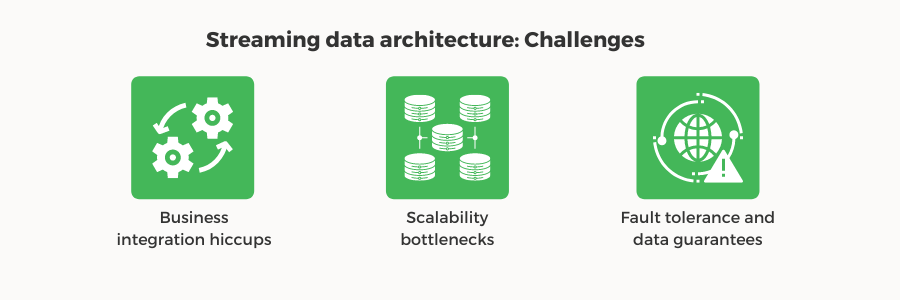
Below are several common challenges organizations encounter when implementing streaming systems, along with practical approaches to addressing them.
Business Integration Complexity
In many organizations, data does not originate from a single system. Instead, events are produced by numerous applications developed by different teams across the company. Each of these systems may follow its own data formats, integration standards, and deployment cycles.
As a result, integrating these systems into a single streaming architecture can become complicated. Without clear coordination, changes made by one team can unintentionally disrupt downstream consumers that rely on the same event streams.
To manage this complexity, organizations often adopt an event federation approach, where events are shared through standardized interfaces such as event brokers or message streams. Establishing shared schemas, clear event contracts, and versioning strategies allows teams to evolve their systems independently while still maintaining compatibility across the broader architecture.
Action
Enforce a schema registry (Confluent Schema Registry, AWS Glue, or Apicurio) from day one — it rejects breaking changes at registration time before they reach consumers.
Define event contracts per team: topic name, owner, schema version, SLA, and deprecation policy — treat them like internal APIs.
Default to backward-compatible changes only: adding optional fields is safe; renaming or removing fields is not.
Scalability Bottlenecks
Streaming systems are designed to handle continuous flows of data, but event volumes rarely remain constant. As organizations grow and digital services expand, the number of events generated by applications and devices can increase rapidly.
Without careful planning, this growth can place unexpected strain on system resources. Storage systems may struggle to keep up with incoming data, indexes may become expensive to maintain, and backup or retention processes may begin to impact performance.
To reduce the risk of scalability bottlenecks, engineering teams often simulate expected workloads before deploying a streaming pipeline in production. By replaying historical data or synthetic event streams, they can evaluate how the system behaves under realistic traffic conditions. This approach helps identify infrastructure limits early and allows teams to adjust storage strategies, partitioning schemes, or scaling policies before the system is exposed to production workloads.
Action
Replay historical data through your pipeline before go-live — this surfaces partition imbalances, consumer lag, and storage limits under realistic load.
Size partitions for peak load, not average load — repartitioning Kafka topics in production is painful and disruptive.
Set retention policies and tiered storage early — unbounded log growth is the most common cause of unexpected cost spikes in production streaming systems.
Fault Tolerance and Data Guarantees
Unlike batch jobs that run periodically, streaming pipelines operate continuously. This means that failures — whether caused by network interruptions, service outages, or software bugs — must be handled without interrupting the flow of data.
Streaming architectures must therefore be designed with resilience in mind. Events may originate from multiple sources and arrive in varying formats and volumes, which increases the complexity of ensuring reliable delivery and processing.
To maintain system stability, modern streaming platforms rely on several reliability mechanisms. These often include replication of event logs, automatic failover between nodes, and checkpointing systems that allow processing tasks to resume from a known state after a failure.
When implemented correctly, these mechanisms ensure that even in the presence of infrastructure issues, events are not lost and downstream systems continue receiving consistent data streams.
Action
Set replication factor ≥ 3 for all production topics — this tolerates one broker failure without data loss.
Enable checkpointing in your stream processor (Flink, Spark SS) so jobs resume from a known offset after a crash — not from the beginning of the log.
Route unprocessable events to a dead letter queue (DLQ) — never silently drop them. A DLQ gives you a recoverable audit trail for every processing failure.

What Are the Essential Components of a Stream Data Architecture?
A production streaming architecture is built from four layers. Each layer has a distinct responsibility — understanding where a technology sits helps when evaluating tradeoffs or diagnosing failures.
Four-Layer Architecture
Amazon Kinesis
Google Pub/Sub
Azure Event Hubs
Apache Pulsar
Spark Structured Streaming
Kafka Streams
Google Dataflow
Analytical databases
Time-series databases
Lakehouse systems
What Are the Most Important Stream Architecture Patterns?
As streaming systems grow in complexity, certain architectural patterns repeatedly appear in real-world implementations. These patterns help engineers manage common challenges such as duplicate events, large message payloads, or the need to process events at different levels of granularity.
Idempotent Producer
In distributed systems, temporary network failures or processing errors can cause event producers to retry sending messages. Without safeguards, this leads to duplicate events entering the stream — a problem with serious consequences in financial transactions, order processing, and payment platforms.
An idempotent producer ensures that retrying the same event does not create duplicate records. This is achieved by assigning a unique producer ID and sequence number to each message. When the broker detects a message with an already-seen ID and sequence, it silently discards it.
Idempotent Producer — Sequence Diagram
PID=42, Seq=100enable.idempotence=true · requires acks=allEvent Splitter
A single event often bundles multiple concerns into one payload. This is convenient for the producer but creates unnecessary coupling for downstream consumers — the payment service shouldn’t have to parse shipping instructions just to do its job.
The event splitter pattern breaks a complex event into smaller, focused events. Each downstream service subscribes only to the event type it needs, which reduces processing complexity, improves scalability, and keeps services fully decoupled.
Event Splitter Pattern
CreatedEvent
ProcessedEvent
UpdatedEvent
ScheduledEvent
Event Grouper
Streaming systems process events individually as they arrive. However, many analytical tasks require aggregating events over time rather than reacting to each one in isolation — tracking the number of failed transactions per hour, for example, rather than per event.
The event grouper pattern collects related events into time-based windows before performing calculations. Stream processing frameworks such as Apache Flink and Spark Structured Streaming provide native windowing support for this purpose.
Window Types
Claim-Check Pattern
Event streams are designed to transport messages quickly and efficiently. Passing large payloads — images, documents, videos, large JSON objects — directly through a messaging system increases latency and reduces throughput for every consumer on that topic.
The claim-check pattern solves this by storing the large payload in external object storage and sending only a lightweight reference through the event stream. The consumer reads the reference from the topic and fetches the full payload from storage only when it needs it.
Claim-Check Pattern
This approach is commonly used in architectures that combine streaming systems with cloud object storage or data lakes.
Lambda and Kappa Architecture
As streaming systems mature, teams face a higher-level architectural decision: how to handle both real-time and historical data in the same system. Two patterns dominate this space.
- Lambda architecture runs two parallel pipelines — a speed layer for real-time approximate results and a batch layer for exact historical results. A serving layer merges both views for queries. It was the dominant pattern from roughly 2011 to 2018 but carries a significant operational cost: two codebases, two deployment pipelines, and two sets of bugs to fix.
- Kappa architecture, introduced by Jay Kreps in 2014, eliminates the batch layer entirely. It treats historical reprocessing as a special case of streaming — by replaying the immutable event log from the beginning. This became practical once brokers like Kafka could retain events indefinitely and frameworks like Flink could process them at speed. For most greenfield builds in 2026, Kappa is the right default.
Lambda vs. Kappa Architecture
Hourly / daily
Exact results
Continuous
Approximate
✘ Two codebases to maintain
✘ Operational complexity doubles
Full history replayable
Batch = replay the log
✔ Simpler ops — recommended for 2026
✘ Requires durable, replayable log
Which Data Platform Should You Choose in 2026?
| Feature | Apache Kafka | Amazon Kinesis | Google Pub/Sub | Azure Event Hubs | Redpanda | Apache Pulsar |
|---|---|---|---|---|---|---|
| Deployment | Self-managed clusters or managed services (Confluent Cloud, Amazon MSK) | Fully managed AWS service | Fully managed Google Cloud service | Fully managed Azure service | Self-managed or Redpanda Cloud | Self-managed or StreamNative Cloud |
| Pricing Model | Per broker/per hour; infrastructure costs only | Per shard-hour plus per million PUT records | Per message, based on TiB ingested and delivered | Per throughput unit plus per million events | Per broker/per hour, similar to Kafka | Per compute unit plus storage; tiered storage billed separately |
| Max Throughput | ~10 MB/s per partition | 1 MB/s inbound, 2 MB/s outbound per shard | ~10 MB/s per region, automatically scaled | 1 MB/s inbound, 2 MB/s outbound per unit | ~10 MB/s per partition, with lower latency | ~100 MB/s per topic (partitioned) |
| Default Retention | Configurable, from days to indefinite | 24 hours; up to 365 with add-on | 7 days; up to 31 days | 1 day; up to 90 days | Configurable; tiered storage for long-term | Configurable; native tiered storage |
| Exactly-Once Support | ✓ Yes — idempotent producers and transactions | Limited — at-least-once; requires workarounds | Partial — with Dataflow; otherwise at-least-once | Limited — requires downstream deduplication | ✓ Yes — Kafka-compatible transactions | ✓ Yes — native with deduplication |
| Ecosystem | Broadest: Kafka Connect, Streams, Flink, Spark | Tightly integrated with AWS services | Integrated with Google Cloud services | Integrated with Azure services | Kafka-compatible drop-in replacement | Growing: Pulsar Functions, Flink, Spark |
| Scalability | Horizontal via partitions and brokers | Via shards; manual resharding | Global auto-scaling; no partition management | Via throughput units with autoscaling | Horizontal via partitions; no JVM overhead | Native multi-tenancy; independent compute/storage |
| Client Library Maturity | Every major language; 10+ years battle-tested | AWS SDKs; strong Java/Python | Google Cloud libraries using gRPC | Azure SDKs with AMQP and Kafka protocol | Uses Kafka libraries directly; no new SDK | Native Java/Python/Go/C++; Kafka layer |
| Operational Complexity | Moderate — cluster management required | Low — fully managed | Low — fully managed | Moderate — simplified, but configurable | Lower — no JVM tuning; simpler ops | Higher — three-tier architecture |
| Best For | High-throughput self-managed; industry standard | AWS-native teams; minimal ops | Global-scale workloads; no partitions | Azure-native teams; Kafka protocol | Lower latency; simpler ops; no JVM | Multi-tenant platforms; long-term retention |
Best Practices for Implementing Your Stream Data Architecture
The most successful implementations will balance technical capabilities with business objectives, ensuring that real-time processing delivers tangible value rather than simply adding complexity to the data platform. Organizations adopting streaming systems often follow several practical guidelines:
- start with a well-defined use case
- introduce streaming pipelines gradually
- monitor performance and reliability across the pipeline
- maintain schema governance and event versioning
- plan for schema evolution over time
- design systems to tolerate failures
Those who master these technologies will gain significant competitive advantages through enhanced agility, deeper customer insights, and the ability to trust stream as an enduring partner in their data strategy.
Decision Framework
Work through these five questions before committing to a streaming architecture.
YES ↓
YES ↓
(Spark trigger mode, dbt 5-min refresh)
YES ↓
YES ↓
(Kinesis, Pub/Sub, Confluent Cloud)
YES
MSK / Confluent Cloud / Pub/Sub
Confluent Platform, Flink on K8s, MSK in VPC
Diagram 5 — Decision tree for streaming adoption. Exit early at any NO that leads to a simpler alternative. © addepto.com
When Should You NOT Use Streaming Data Architecture?
Streaming sounds modern and most cloud vendor marketing pushes you toward it , but for several common workloads, batch is still the right tool. Choosing streaming for these situations will cost you 3–10x more in infrastructure and operational overhead for no measurable business benefit.
Five situations where you should default to batch
Check out our data engineering services
FAQ
Is streaming analytics right for my business?


Streaming analytics provides exceptional value for businesses that need real-time decision-making capabilities, particularly in e-commerce, online advertising, IoT services, financial services, and healthcare. If your organization depends on timely insights from continuously generated data, a streaming architecture is likely essential for your data center.
What are the essential tools for data streaming?
Will I lose historical data with streaming architecture?
No, streaming architectures are designed to preserve historical data while enabling real-time processing. With proper data lake implementation, you can maintain complete data history while still benefiting from immediate insights. Modern streaming systems include scalable data storage solutions that support both real-time and historical analysis.
What are examples of streaming data in everyday life?
Streaming data includes:
- Social media feeds
- Financial market tickers showing stock price movements
- Weather sensor readings
- Website clickstream data
- IoT device telemetry
- Geolocation data from mobile devices
- Video game analytics
- Network traffic monitoring
How is data consistency maintained in streaming systems?
Data consistency in streaming systems is maintained through a combination of processing guarantees, durability mechanisms, and careful application design.
-
Exactly-once processing guarantees ensure that each event affects the system’s state only once, even in the presence of retries or failures.
-
Transaction logs and replay capabilities allow systems to reconstruct state by reprocessing events from an append-only log when something goes wrong.
-
Checkpointing mechanisms periodically persist the state of streaming jobs so they can recover to a consistent point after crashes.
-
Idempotent operations make it safe to process the same event more than once without changing the outcome, which is crucial for at-least-once delivery models.
-
An ordered sequence of data processing ensures that events are handled in a consistent order (e.g., per key), preventing anomalies caused by out-of-order updates.
-
Schema validation and enforcement prevent malformed or incompatible events from corrupting downstream state by ensuring data conforms to an expected contract.
Exactly-once is achievable but always more expensive than at-least-once, so most teams should start with at-least-once plus idempotent consumers and only move to exactly-once for workloads where duplicates have monetary or regulatory consequences.
What characteristics of streaming data make it challenging to work with?
Streaming data is hard to work with because it never stops, arrives fast, and behaves unpredictably.
-
It is a continuous, unbounded flow, so systems must run indefinitely and manage growing state instead of fixed batches.
-
It often comes at high volume and velocity with spikes, forcing careful scaling and backpressure handling.
-
Events can be late, out of order, duplicated, or malformed, which complicates aggregation, correctness, and schema evolution.
-
You must maintain fault tolerance and low latency at the same time, which makes the infrastructure and operations significantly more complex.
Kafka vs. Flink: Which one do you actually need?
In most cases, both, but not necessarily at the same time.
They solve different problems and often work best together. The real question is: which should you adopt first?
Apache Kafka is your transport layer. It acts as a distributed, durable event pipeline that moves data from producers to consumers while keeping it available for replay. You’ll typically need Kafka (or a cloud equivalent like Kinesis, Pub/Sub, or Event Hubs) once multiple systems need to consume the same event stream or when retaining events for reprocessing becomes important.
Apache Flink is your processing layer. It consumes data from Kafka (or similar platforms), applies transformations, aggregations, joins, and time-based logic, then sends the results downstream. You’ll need Flink (or alternatives like Spark Structured Streaming or Kafka Streams) when event processing becomes more complex than simply writing data into a database.
A practical approach? Start with Kafka. Use Kafka Connect or lightweight consumers to move and handle data. Bring in Flink when your streaming logic grows to include real-time aggregations, windowed metrics, or stateful processing that would be difficult to manage in application code.
What does a production streaming pipeline cost?
Infrastructure costs vary, but for a moderate-volume production setup (roughly 1,000–10,000 events per second), there are three primary cost drivers:
- Managed messaging infrastructure (Kafka/MSK, Confluent Cloud, Kinesis, Pub/Sub, Event Hubs): typically $500–$5,000/month, depending on throughput, retention, and redundancy requirements. Self-managed Kafka can reduce infrastructure spend, but increases operational overhead significantly.
- Stream processing compute (Flink, Spark Structured Streaming, Kubernetes, managed services): generally $300–$3,000/month, with stateful workloads and large processing windows increasing costs substantially.
- Storage and data transfer: often underestimated. Replication, cloud storage sinks, and data movement into analytics platforms can easily exceed core messaging costs.
For most production systems in this range, a realistic total budget is $1,500–$10,000 per month, excluding engineering time. If a proposal looks dramatically cheaper, it’s worth checking what assumptions were left out.
Lambda vs. Kappa architecture: Which should you choose?
Both architectures address large-scale data processing, but in 2026, the decision is usually straightforward: for most new systems, Kappa is the better default.
Lambda architecture relies on two parallel data pipelines: a speed layer for fast, near-real-time processing and a batch layer for slower, more accurate retrospective computation. Query results combine outputs from both. This was a widely adopted pattern in the early big data era, but it comes with a major downside: maintaining two separate processing paths adds significant operational complexity.
Kappa architecture simplifies the model by using a single streaming pipeline. Historical reprocessing happens by replaying the event log rather than running a separate batch system. This approach became practical as platforms like Kafka added long-term retention and modern stream processors such as Flink and Spark matured.
For most greenfield projects, Kappa offers a cleaner and more maintainable approach. One pipeline means less infrastructure, simpler debugging, and lower operational overhead. Lambda still makes sense in specific cases—such as when you’re tied to a legacy batch system that can’t yet be retired, or when compliance requirements demand separate batch reconciliation workflows.
Category: